
All’accesso a Windows XP vi trovate questa immagine?
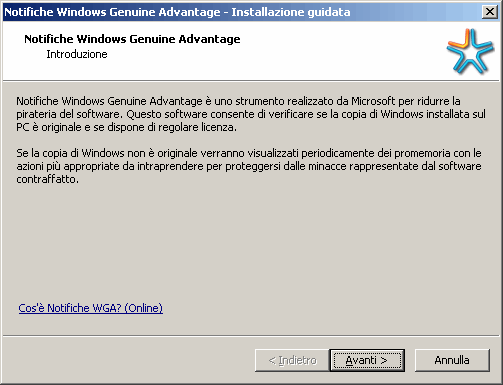
Volete sapere come rimuoverla?
Procedete così:
- Aprire le operazioni pianificate (Tasks), fare clic sul pulsante Start, scegliere Tutti i programmi, Accessori, Utilità di sistema, quindi fare clic su Operazioni pianificate.
- Eliminare il task WGASetup (cliccarci sopra, tasto destro, elimina)

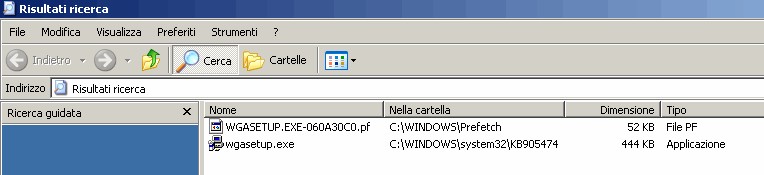
- Fare clic sul pulsante Start, scegliere Cerca, abilitare la ricerca nei file nascosti e di sistema (opzioni avanzate) ed inserire come stringa di ricerca wgasetup.exe
- Eliminare i file trovati


22 Ottobre, 2009 21:59
grazie mille, fortissimi!!
23 Ottobre, 2009 09:55
Più chiaro di così non si poteva…
grazie mille
29 Ottobre, 2009 14:59
Grazie, lo proverò; sai mica come si fa x togliere anche quello di Office? (office Genuine Advantage)
29 Ottobre, 2009 15:20
Ciao Stefano,
per Office cerca “rimuovere office wga” in Google 😉
8 Novembre, 2009 17:32
Siete grandi!
Grazie.
10 Novembre, 2009 15:02
Very well, erano giorni che cercavo i file da rinominare e da eliminare… niente di più semplice. Grazie
20 Novembre, 2009 13:13
Bravo! Grazie
29 Novembre, 2009 17:26
ho risolto grazie sieti fantastici
6 Dicembre, 2009 10:24
ok
6 Maggio, 2010 19:17
Grazie il consiglio ha funzionato !!!!! :-)))
19 Maggio, 2010 09:20
Eccellente! Grazie
21 Gennaio, 2011 09:38
IMMENSI!!!!!
3 Febbraio, 2011 20:10
Sei il mio dio!!!!!!!!!!!
4 Febbraio, 2011 10:34
Un pochino esagerato… 🙂
12 Marzo, 2011 10:32
Ciao perfetto, semplice e chiaro
grazie
28 Aprile, 2011 21:22
grazieeeeeeeeeeeeeeeeeeeeeeeeeeeeeeeeeeeeeeeeeeeeee
11 Maggio, 2011 08:18
GRAZIEEEEEEEEEEE!
14 Giugno, 2011 02:08
Libidinoso! Adesso facciamola ancora più semplice: le directory sono uguali per tutti, quindi senza usare Trova cancelliamo subito c:\windows\system32\KB05474\wgasetup.exe e c:\windows\prefetch\wgaeccetera… quest’ultimo non l’avevo… ma godo cmq!
14 Giugno, 2011 10:22
Ciao Debablu,
grazie per il tuo contributo, volevo sono fare due piccole considerazioni; la prima è che la cartella di sistema non è sempre C:\WINDOWS, quindi se proprio vogliamo dare un percorso assoluto questo è %WINDIR%\System32\KB05474\wgasetup.exe eccetera.
Per secondo, in base alla mia esperienza decennale nell’assistenza posso dirti che con utenti inesperti fai prima a fargli usare la funzione cerca.
3 Ottobre, 2011 21:44
oooh finalmente… odio gli avvii automatici ma questo superava il limite!
30 Gennaio, 2012 18:05
Sei stato bravo!!Grazie
20 Febbraio, 2012 13:24
Ciao io vorrei sapere come ripristinare il pc bloccato da wga ho provato anche a formattarlo ma non me lo fa fare mi aiuti? Grazie
20 Febbraio, 2012 18:19
WGA non blocca il PC, solo in caso di licenza rilevata non originale mostra un avviso e limita delle funzioni; la formattazione lo rimuove quindi ho lo hai reinstallato o stai usando una versione “sbagliata” di Windows per l’installazione.
4 Febbraio, 2014 18:51
ciao, anke io nn riesco a disinstallarlo anzi,mi è comparsa una scritta sotto.mi dice “il softwar potrebbe essere contraffatto questa copia di windows non ha superato la convalida di autenticità” cosa posso fare…grazie
5 Febbraio, 2014 23:29
L’articolo non tratta la rimozione di WGA installata, ma come disabilitare la continua richiesta d’installazione ad ogni logon.