In Microsoft Access è possibile in maniera estremamente semplice collegare o importare tabelle da un altro database, basta creare un nuovo database, andare in tabelle, premere il tasto destro e selezionare IMPORTA o COLLEGA.
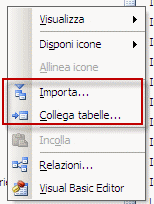
Il problema nasce quando il database non ha le classiche estensioni, infatti dalla finestra di selezione non è possibile impostare come filtro estensioni tutti i file (*.*)
Ecco come aggirare il problema
1. Per prima cosa rinominare il database con estensione "custom" (nel mio caso base.test) nell’estensione ufficiale mdb (quindi base.mdb)
2. A questo punto è semplice effettuare il collegamento mediante la normale procedura Access, tasto destro > Importa… o Collega tabelle…
3. Una volta finita la proceduta di collegamento o importazione tabelle ripristinare l’estensione custom della base dati (nell’esempio base.test)
4. Nel database dove la tabella collegata, selezionatela e tasto destro > Gestione tabelle collegate
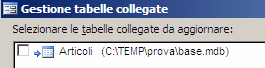
5. Selezionate la riga mediante il segno di spunta sulla sinistra e premete OK
6. Nella nuova finestra di selezione, alla voce Tipo file impostate Tutto (*.*)

Ecco il risultato: